What's the difference between Homeowner and Professional workspaces?
Compare Homeowner and Professional SimplyScapes workspaces, including Jobs, Site Plans, clients, business profiles, and team access.
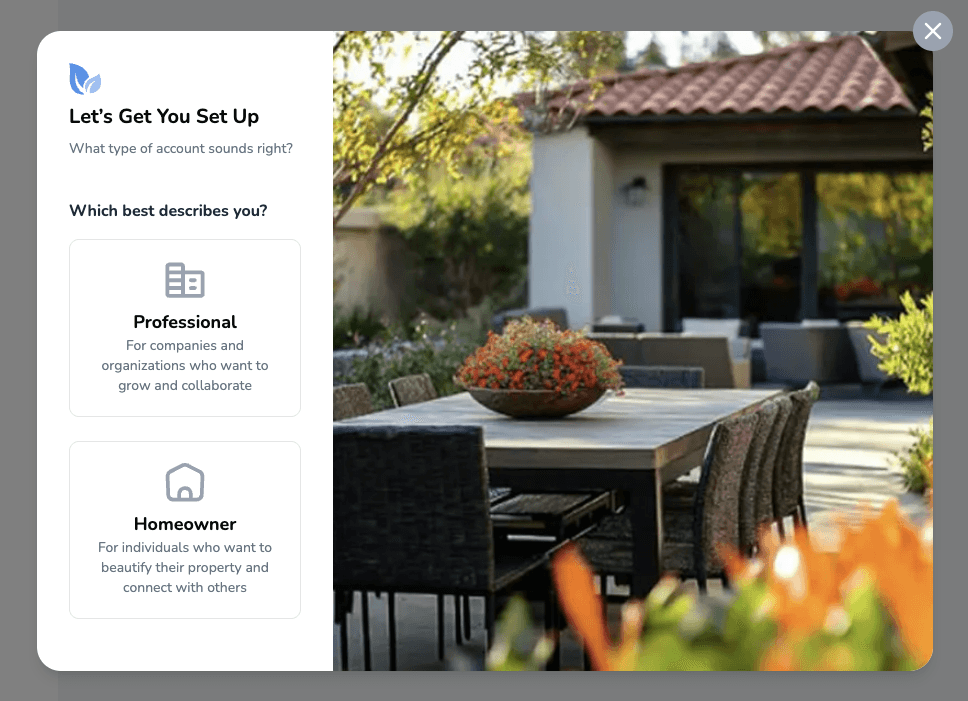
Homeowner and Professional workspaces share the core design and job-planning tools. The workspace type changes how SimplyScapes organizes the work and whether business features such as clients and team access appear.
Homeowner workspaces
Choose Homeowner when you are planning your own property.
What you get:
- Home, which keeps your property's job phases together.
- Visual Designs and PDF exports with plant lists.
- A Site Plan created from the job's property address.
- Estimate tools and the Build task board in Labs Preview.
- Property-based plant recommendations when you add an address.
The default name is Personal Workspace, and you can rename it. Homeowner workspaces are intended for one person.
Professional workspaces
Choose Professional when you manage landscape work for clients or with a team.
You get the same Jobs, Visual Design, Site Plan, Estimate, and Build tools, plus:
- A client list for organizing people and properties.
- A standalone Site Plans list in the sidebar.
- A Google Business Profile connection.
- The Manage people area for inviting teammates and assigning roles.
Plans and workspace types
Free and Plus are billing plans. Homeowner and Professional are workspace types. A Plus subscription raises the design, AI-render, plant-library, and Professional-client limits for that workspace; it does not change the workspace type.
Separate billing
Each workspace has its own plan and billing information. A subscription on one workspace does not change the plan for another workspace you belong to.
How do I create my workspace?
Create your first SimplyScapes workspace with the setup wizard. Choose a Professional or Homeowner type, name it, and start designing in a few quick steps.
How do I add and manage team members?
Invite teammates to a Professional or Education workspace, assign Member or Admin access, and manage pending invitations in the SimplyScapes Labs People area.